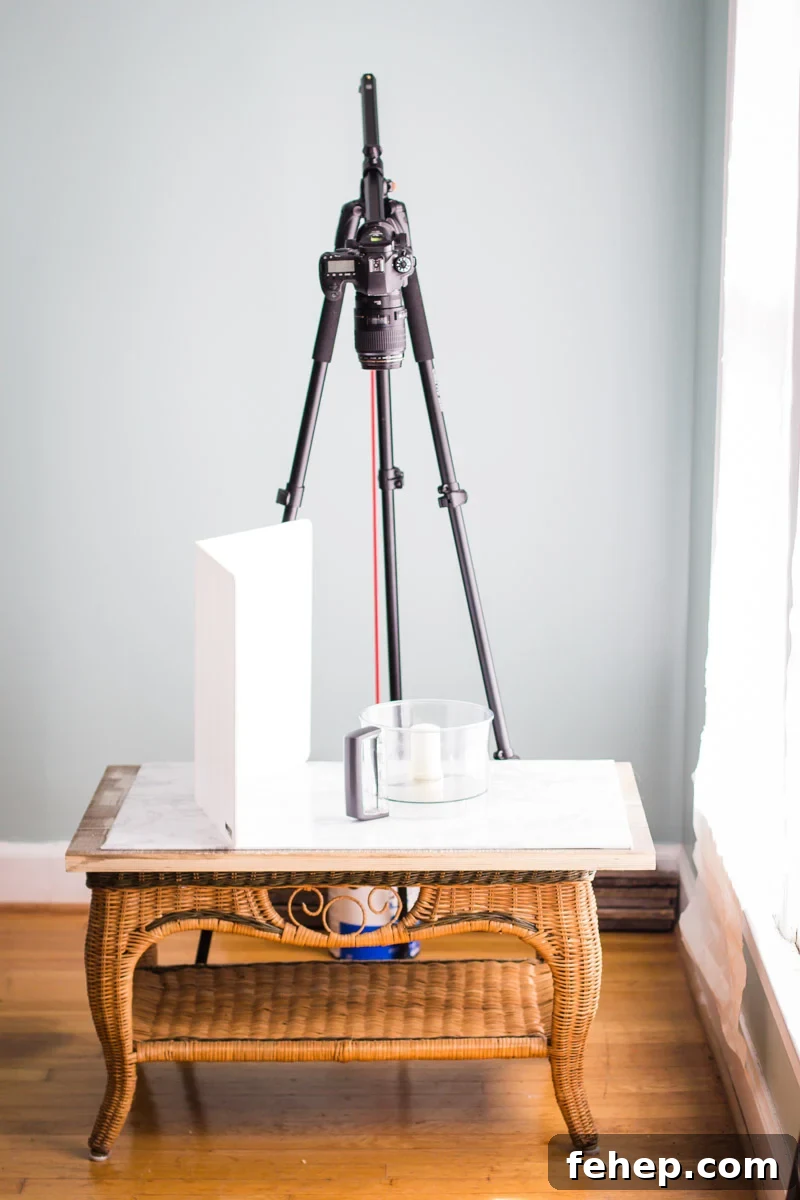
One of the most common questions I receive lately is about my setup and process for creating “Tasty Style” recipe videos. I’m not claiming to be an expert, but after a year of producing recipe videos I’ve learned a lot. What began as an experiment has become my full-time work—and something I absolutely love.
I’ll break this into a series of posts, beginning here with the specific equipment I use and why. This overview covers the cameras, lenses, tripods, lighting, editing tools, props, and a few practical tips that have made a real difference for me.
If you haven’t heard it yet, I was interviewed on the Food Blogger Pro Podcast about my approach to video and how I built a career making food content from home. That conversation touches on my workflow and how I transitioned into working for myself. I also include recent videos I produced for my blog and for clients: Blender Banana Oatmeal Muffins, Thai Chickpea Curry, and Sweet Potato Quinoa Bowl.
Cameras
I currently shoot with two Canon DSLRs:
- Canon 6D – This is my primary camera for most shooting. I usually pair it with a 50mm 1.4 lens and mount it on an overhead tripod for the majority of action shots.
- Canon 60D – My older, first DSLR. I use it for side-angle “sexy” shots and for hero images of finished dishes. It typically wears a 100mm macro lens or sometimes an 85mm lens and sits on a second tripod for flexibility and simultaneous two-camera shoots.
Lenses
The three lenses I rely on are:
- 50mm 1.4 – My go-to lens for overheads and general photography. It’s versatile, sharp, and excellent value for the price.
- 100mm macro – A game-changer for getting tight, detailed close-ups. I use this lens for most hero and close-up shots because the detail really helps draw viewers into the video.
- 85mm – An extra lens I used more before the 100mm macro. It still sees occasional use but not as often.
Tripods
I use two identical tripods: the Vangard Alta Pro 263AB. I liked it enough to buy a second one.
Why I like it: it’s sturdy, affordable, and doesn’t require additional accessories for overhead work. The main arm adjusts so you can position the camera overhead without buying extra mounts. For counterbalance I attach a bungee cord and a half-empty paint can to the end of the arm.
Do you need two tripods? Not necessarily. If you’re filming just one video per week, one tripod is likely sufficient. I use two because I produce many videos weekly and like to keep one tripod set up overhead while the other captures side angles or hero shots. Two tripods also allow recording on both cameras simultaneously.
Advice for a one-tripod setup: plan shots in advance. For example, film part of a pouring shot from one angle, then reposition the tripod and film the rest from the other angle. Splitting the action makes it easy to capture both perspectives without a second tripod.
SD Cards
I’m a fan of SanDisk SD cards. I use several reliable cards and haven’t had issues with them.
Editing Software
I edit with Adobe Premiere and occasionally use Adobe After Effects for animated text and small motion elements. Premiere handles the bulk of my editing needs.
Where I started: iMovie. It’s a great free tool to learn the basics before moving to Premiere or Final Cut Pro.
How I learned: many of my early skills came from The Blog Village tutorials. They provided practical, detailed walkthroughs that helped me learn editing techniques and workflows.
Lights
I bought two Flolight fluorescent panels based on recommendations and used them to shoot when daylight was limited. After experimenting, I prefer natural light for the softness and look it creates. That said, I still use artificial lights occasionally to fill or balance shadows, especially when natural light is inconsistent.
Why natural light: it creates a soft, appealing look that suits my style.
Why others prefer artificial light: consistency. Sunlight shifts throughout the day and clouds change color and intensity, which can make matching shots difficult. Artificial lights make it easier to achieve a uniform look and simplify color and exposure matching during editing.
Microphone
I have an on-camera Rode microphone that’s easy to set up and works well for on-camera narration. For in-person client shoots I’m moving toward lavalier microphones for clearer dialogue capture.
Surfaces
I use a mix of DIY surfaces and shop-bought boards. My favorite purchased surfaces come from Erickson Woodworks; I have two double-sided boards (four looks total) that are lightweight and easy to move yet durable for shoots.
I also made a simple surface from white foam board and faux marble self-adhesive paper. It’s affordable, lightweight, and easier to handle than a heavy real marble slab.
Extras
I use a low wicker coffee table as a work surface during shoots—it positions my props at a comfortable height for overhead camera work. For bowls and props I shop thrift stores and World Market for affordable, characterful pieces.
Sharing videos
For client work and my own videos I upload final files to Dropbox for easy access and distribution. The app makes it simple to transfer videos to other devices or upload to social platforms like Instagram.
If you have questions about any of the gear or want suggestions for specific shoots, feel free to ask in the comments or email me at [email protected]. If there are topics you’d like covered in future videography posts, let me know—I’m happy to write more about workflow, editing tips, or shot lists.
Some links referenced are affiliate links; if you purchase through them I may earn a small commission at no extra cost to you.